
Preview, share, and get feedback on HTML5 banner ads and social ad mockups with Adpiler Com.
Free·from $39/mo
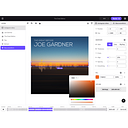
SongRender (Design & Creative): SongRender is a browser-based video maker for music visualizers and podcast clips, optimized for social media engagement. Pricing: Free plan available; paid plans from $12/mo. (data verified July 2026)
Transparency: if you buy through our links we may earn a commission, at no extra cost to you. Rankings cannot be bought. How we rate tools
SongRender helps musicians, podcasters, and content creators turn audio into engaging video for social media. It solves the problem that most social networks don't allow audio-only uploads, so you need a video wrapper to share music or podcast episodes. SongRender provides drag-and-drop editing, customizable music visualizers, progress bar animations, and export presets for platforms like Instagram, TikTok, YouTube, and LinkedIn.
It is ideal for independent musicians, podcast hosts, and social media managers who want to quickly produce professional-looking video content from audio files without learning complex video editing software. It is not suited for filmmakers or video professionals who need multi-track timelines, keyframe animation, or advanced color grading — those users should look at DaVinci Resolve or Premiere Pro.
Create a lyric video with a waveform visualizer for an Instagram Reel. Turn a podcast interview into a shareable clip with a progress bar and lower-third graphics. Generate a promotional video for a new single featuring album artwork and animated text. SongRender makes these workflows fast and repeatable, with over 50,000 videos made by users to date.
Editorial score from our review methodology — not user ratings.
SongRender pricing: Free plan available; paid plans from $12/mo. Billing model: Freemium.
For comparison: the median starting price in Design & Creative is $12/month, measured across 274 tools we track. See the full SaaS Pricing Index →
Unlimited 720p watermarked videos with up to 10-minute duration. Videos saved forever. No credit card required.
1 non-watermarked video per period, up to 10 minutes, 1080p resolution, faster rendering.
5 non-watermarked videos per period, up to 30 minutes, 1080p resolution, faster rendering.
12 non-watermarked videos per period, up to 60 minutes, 1080p resolution, faster rendering.
Note: All paid plans include faster rendering times. Custom plans are available — contact SongRender for bespoke pricing.
Don’t take our word for it — ask your AI about SongRender




Preview, share, and get feedback on HTML5 banner ads and social ad mockups with Adpiler Com.

AI-powered carousel maker for LinkedIn, Instagram & TikTok — free plan, PRO from $12/mo.

Uxcel is an interactive learning platform for UX design, PM, and AI skills for busy professionals.

AI-powered branding platform generating logos, websites, social assets, and print materials from a business name.
Compare: SongRender vs Adpiler Com SongRender vs aiCarousels SongRender vs Uxcel SongRender vs Design.com